Overview
BlueFerry connects your Linux computer directly to your iPhone using Bluetooth profiles that iOS supports natively. One background service on the computer holds the connection; the graphical and terminal clients show your conversations.
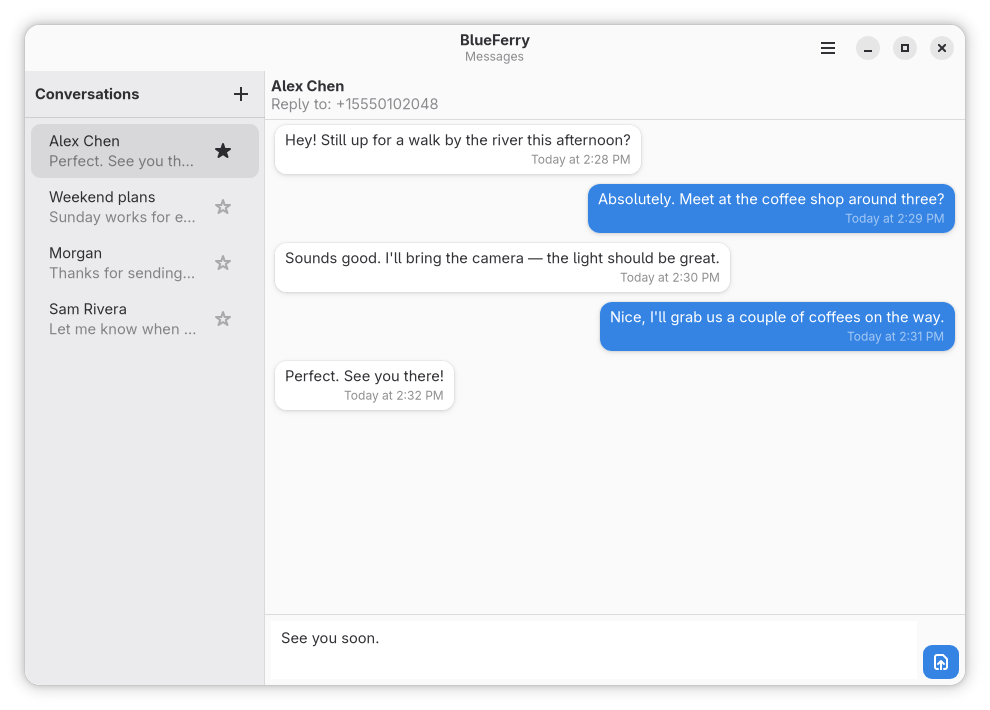
What works
- Receive and send SMS, RCS, and iMessage through the iPhone.
- Start a new conversation and search synced contacts.
- Sync contacts, including phone numbers and Apple ID email addresses.
- Mark messages read from the desktop.
- Show desktop notifications for messages and, optionally, for other iPhone apps.
- Group chats, when BlueFerry can identify the participants safely.
- Keep local history encrypted with GNOME Keyring or KDE Wallet.
- Use native GTK, KDE/Kirigami, Quickshell, or terminal clients.
What doesn't work
These are limits of what iOS exposes over Bluetooth, not missing settings:
- BlueFerry only knows messages it sees while connected. It doesn't download your iCloud Messages archive or your complete sent-message history.
- Attachments, reactions, and typing indicators are not supported.
- Calls and FaceTime are not supported; calls and music stay on the iPhone.
- Bluetooth gives BlueFerry no reliable group ID or complete member list, so group replies are deliberately cautious (see Group chats).
- Notifications from other iPhone apps are display-only. You can't reply to them.
How it connects
BlueFerry uses three standard Bluetooth services:
| Service | Bluetooth | Provides |
|---|---|---|
| MAP (Message Access Profile) | Classic | Messages, read state, sending |
| PBAP (Phone Book Access Profile) | Classic | Contacts |
| ANCS (Apple Notification Center Service) | Low Energy | Optional notifications and group-message details |
Messages and contacts work without ANCS. ANCS adds the information BlueFerry needs to recognize group messages and lets it mirror other app notifications.
Requirements
- A Bluetooth adapter with Bluetooth Classic and Bluetooth 4.0 or newer with LE advertising. LE advertising is needed even for messages and contacts, because it makes the iPhone show their permission switches. Bluetooth 3-only adapters don't work.
- BlueZ 5.72 or newer for messages and contacts. iPhone system notifications (ANCS) need BlueZ 5.86 or newer.
- An iPhone. Most development used an iPhone 16 Pro Max on iOS 26.5, with additional successful tests on an iPhone 17 Pro Max with an iOS 27 beta. For iOS 18 or earlier, use compatibility pairing (see Pair an iPhone).
Support varies between adapters and iOS versions. Realtek adapters generally don't support system notifications or group chats.
Conversations
Direct conversations combine the phone numbers and email addresses that belong unambiguously to one synced contact. Replies go to the most recent incoming address, shown as Reply to above the conversation. Shared addresses, and contacts that merely have the same name, stay separate.
Group chats
Bluetooth doesn't tell BlueFerry a group's ID or full member list, so it disables replies when the participants are unclear:
- For a named group, BlueFerry learns members only from the people who send to it. It asks you to confirm the full reply list once.
- The saved list stays until you delete the conversation, clear history, or change the storage mode. It doesn't change the group on the iPhone.
- A message is filed under its group only when BlueFerry also receives the iPhone's notification for it. Without one, it appears in the sender's one-to-one conversation.